How to connect Cyberduck to Tenbyte T2 object storage in minutes
Connect Cyberduck to Tenbyte T2 object storage in a couple of minutes with a ready-made profile. Includes what T2 offers (eleven-nines durability, no egress fees, $10/TB) and steps for macOS, Windows and Linux.

Tenbyte T2 is S3-compatible object storage. Anything that already talks to Amazon S3 talks to it too: the AWS CLI, rclone, s3cmd, and Cyberduck, the free desktop client for macOS and Windows. Connecting Cyberduck takes a couple of minutes, once you get past one setting that catches most people out.
That setting has a fix, and we've packaged it into a ready-made connection profile. Download it, open it, add your keys, and you're connected. The connection steps come first; if you want the background on what T2 offers and who uses it, that's at the end.
The easy way: download the profile
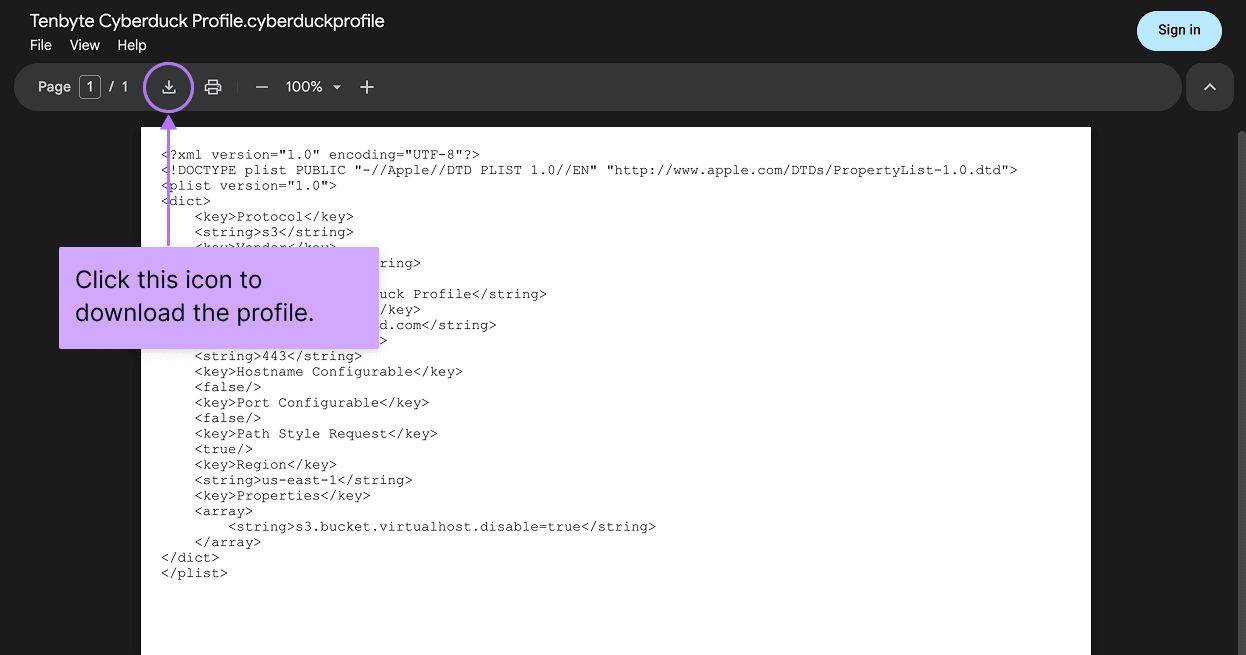
Grab the profile file here:
⬇ Download the Tenbyte Cyberduck Profile

That single file already has everything set correctly: the T2 endpoint, the port, and the one addressing setting Cyberduck otherwise gets wrong for S3-compatible storage. There is nothing to edit inside it and no commands to run. It holds no passwords, so you can share it with a teammate and each person adds their own keys when they connect.
The one thing you still need: your S3 keys
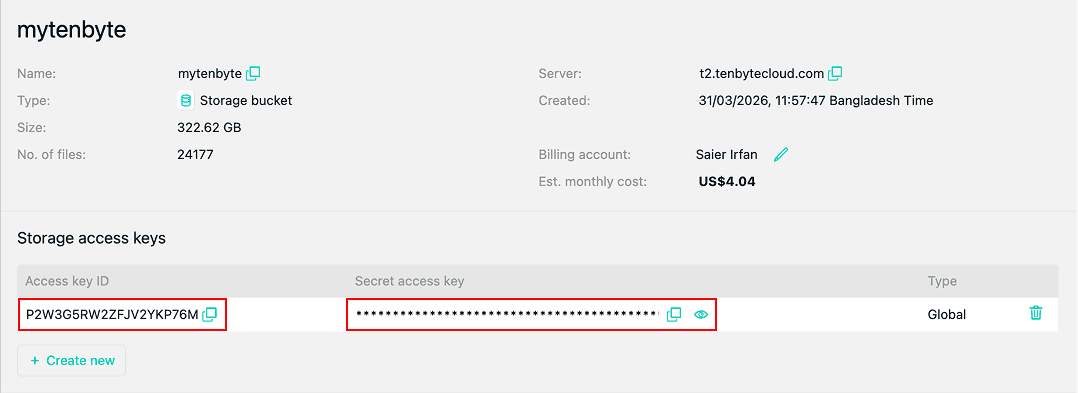
The profile handles the connection settings, but it can't hold your credentials for you. You need an S3 access key and secret key pair from Tenbyte.

One warning that saves a lot of confusion: these are not the same as your Tenbyte API key. The API key runs the management side of your account. Object storage uses a separate S3 access key and secret key. You'll find them in the Tenbyte console under object storage, listed as an accessKey and a secretKey. Copy both and keep them handy.
macOS
- Install Cyberduck from cyberduck.io/download if you don't already have it. It's free.
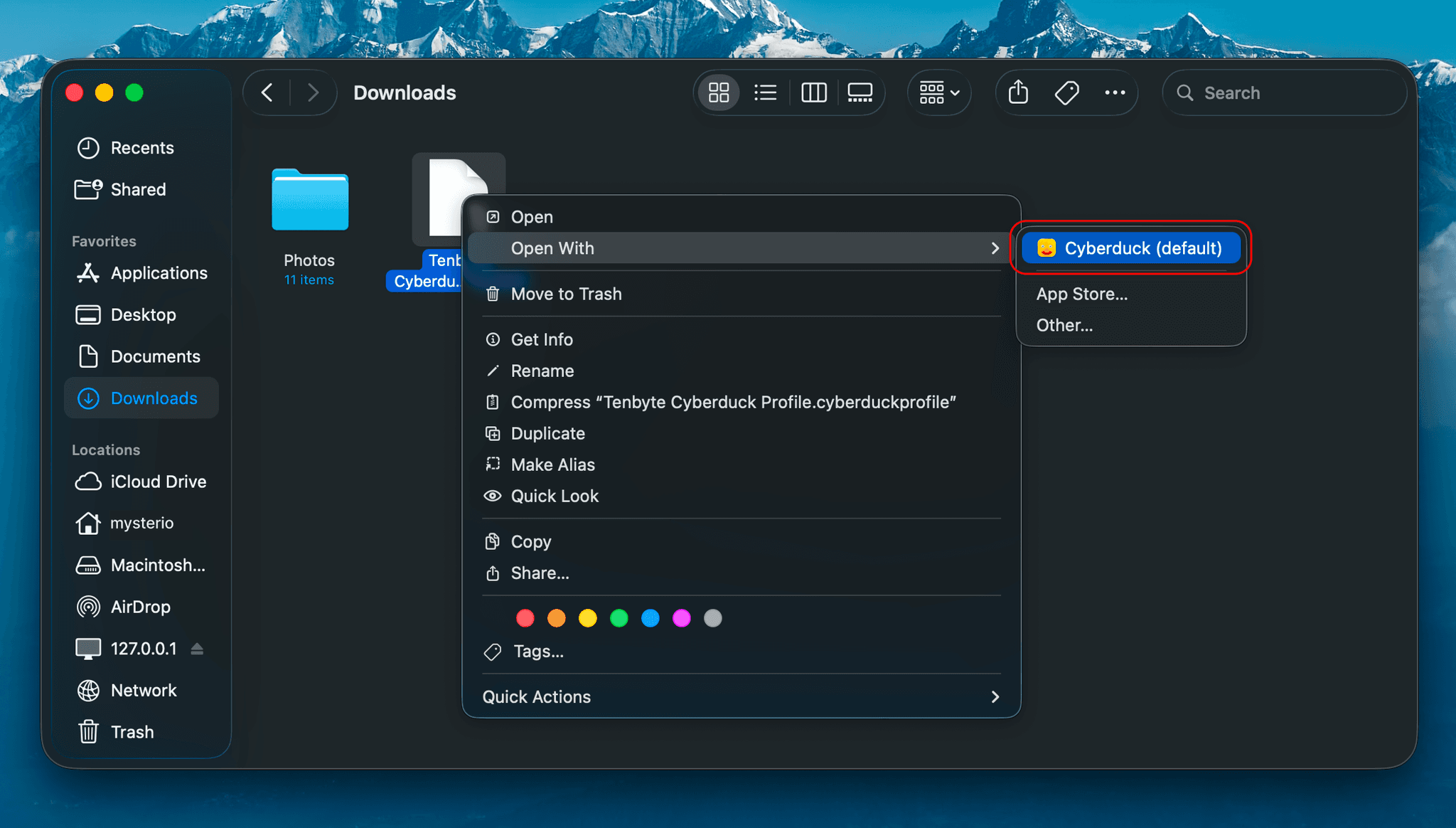
- Download the profile and double-click it. Cyberduck opens and registers it, and Tenbyte Cyberduck Profile shows up in its list of connection types.
- Open the Bookmarks view and click the + at the bottom-left to add a new bookmark.
- In the protocol dropdown at the top, choose Tenbyte Cyberduck Profile. The server and port fill in on their own.
- Put your access key in the username field and your secret key in the password field.
- Close the editor and double-click the bookmark to connect.
Your buckets appear, and you can open them and move files straight away.

Windows
The steps are the same, because the profile carries the fix with it:
- Install Cyberduck from cyberduck.io/download if you don't already have it.
- Double-click the downloaded profile. Cyberduck imports it.
- Add a new bookmark and pick Tenbyte Cyberduck Profile as the protocol.
- Enter your access key and secret key.
- Connect.
No configuration files, no registry edits. The profile has already done that part.
Linux
One honest note: there's no Cyberduck desktop app for Linux. It's built for macOS and Windows only, so if you find something claiming to be Cyberduck for Linux, it isn't the real thing.
There is a command-line companion called Cyberduck CLI, the duck tool, which runs on Linux and reads the same profile. If you're comfortable in a terminal, drop the profile in place and use it from there. If you'd rather have a friendlier tool, rclone works well with T2: point it at t2.tenbytecloud.com, add your keys, and turn on path-style addressing.
If a bucket won't open
Almost every problem here comes down to one of two things.
A DNS error that mentions your bucket name as part of the hostname means the addressing fix didn't take. Re-download the profile and import it again, and that's the whole cure.
A SignatureDoesNotMatch message is about the keys, not the connection. Re-copy your access and secret key, and check you didn't pick up a trailing space when pasting.
That's the whole process: one download, your two keys, and you're in. The profile handles the setting that makes S3-compatible storage like T2 behave, so you never have to think about it.
Why store on Tenbyte T2
The storage speaks S3, so you point your existing tools at a new endpoint and keys and carry on. Durability is quoted at 99.999999999% a year, or eleven nines. The clusters run Ceph, built to Red Hat's reference specifications, with no throttling on throughput.
There are no egress fees, so reading your own data back out costs nothing. That is usually where the large clouds charge the most. Pricing starts at $10 per TB per month, which Tenbyte puts at about 90% below the big public clouds. If you are coming from another S3 provider, moving over is usually a credentials-and-endpoint swap rather than a rewrite, and the migration service can copy existing data across in one pass or in stages.
Who uses it
Most people who reach for object storage have the same problem: a growing pile of files that doesn't fit in a database and shouldn't sit on one server's disk. SaaS products keep user uploads, application assets, logs, and backups there. E-commerce sites store product images, videos, invoices, and catalogs. Development teams push CI/CD artifacts, packages, and deployment files. Media companies and creators hold video, audio, images, and stream recordings, often with a CDN in front for playback. AI and machine-learning teams keep training datasets, model files, and generated output.
It also suits data that has to be kept rather than served. Enterprises centralize documents, file shares, and compliance archives. Government and public-sector bodies store records, GIS data, and citizen-service assets where data sovereignty matters. Healthcare providers hold medical images, patient documents, and lab data. Universities and research groups keep datasets, lecture recordings, and digital libraries. Backups and disaster-recovery snapshots get a cheap, durable home, and hosting providers and MSPs resell the capacity to their own customers. Cloud-native apps, from Kubernetes workloads to serverless functions, use it as their durable store.
The workloads that land here look like this:
- Application assets, website static content, and user-generated uploads
- Images, video, and audio
- Database backups and VM snapshots
- Log files and compliance archives
- AI datasets and data lakes
- Software artifacts and container images
Read More
块存储 vs. 对象存储:你真正需要哪一种?
比较 Cloud Computing 中的块存储与对象存储。了解性能、定价、使用场景以及需要避免的常见错误。

边缘计算:这场静悄悄的技术革命如何改变云计算
Discover how edge computing powers faster, safer, and smarter tech, from gaming to healthcare, making your connected life smoother and more efficient.

使用 Tenbyte T2 Object Storage 降低 Cloud 成本并提升效率
Tenbyte T2 Object Storage:S3-compatible。无隐藏费用。为媒体、备份和大数据提供安全、可扩展的 storage。
快照 vs. 备份:了解它们在现代数据保护中的作用
了解为什么仅靠快照会在勒索软件攻击期间失效,以及备份如何保护您的 cloud 数据免于永久丢失和漫长恢复时间。